
 Whilst working on various files in Excel as I do. Having several projects on the go at one time. Multi-tasking at it’s best (or worst?). I noticed that when I selected the [Undo tool] the action I expected to happen did not. And I was taken to the previous file I had been working on. When I looked at the list in the Undo tool I saw far more than I expected to see. Things I knew I had done in another file.
Hey What?
It seems that now, if you have several files open in Excel. The Undo and Redo lists contain all the actions you have performed since opening those files that day. It means that if you work on multiple files at the same time, the undo button makes changes to every spreadsheet you are working on in reverse chronological order. So please do not just select the undo everything in the list thinking it is just for that file that you are currently in. It is not! Apparently this has been the case since 2019. But I have not been aware of it until now.
The Undo and Redo lists
Here are two files that I created and you can see they are very different and only a couple of items have been changed. 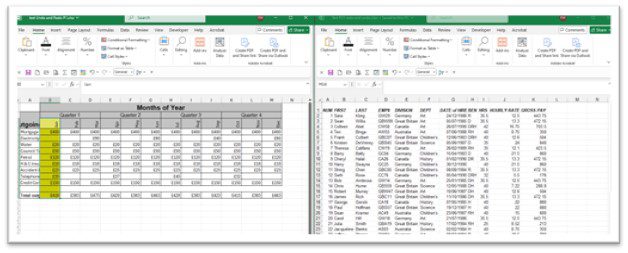
Let us look at the Undo and Redo lists. 
The lists are the same.
In the first file on the left I shall delete rows 7 and 8. 
The Undo list shows this. 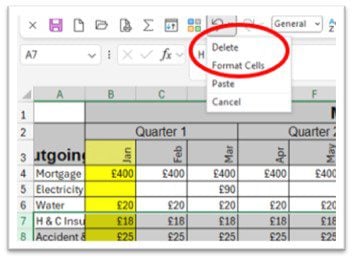
In the second file the Undo lists is identical. 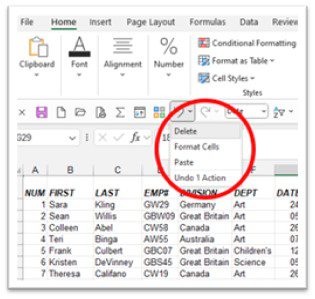
What happens
In the second file I shall select the undo tool because I believe I did something wrong in it and the last action will be reversed. But it will happen in the 1st file not the second. As that was the last action performed in Excel.
Is this possibly why you might be feeling that you have lost your mind and things are coming back in files you were not expecting to. Or worse being deleted again, things you really did not want deleted. No you’re not going mad it’s just Microsoft.
Warning
When you have more than one file open in Excel and make changes in any of them. Be aware that if you select the Undo Tool or any part of the list that is there, it is the last action in ANY file open that is affected in chronological order! Happily, this does not happen in Word!