 I am sure that many of you find it tiresome when you need to return to the last place you were editing in a Word document. Sometimes, I move my mouse to reference information in another part of the document, and I quickly lose where I was. That almost certainly happens if I make a minor change. How do I quickly return to the location I was working on before? There are many different features in Word that can get you to that place. Depending on what circumstances they may be.
You could use the undo feature, but this may remove any of the edits you might have subsequently done, so it is not ideal.
Another method is to use the Mark entry feature from the Index section of the Reference tab. This could be useful if it is a place in your document that you wish to go back to repeatedly. You make a mark to reference that particular word, and stays available until you remove it.
You may use the Bookmark feature in the Links section of the Insert tab. Here you use the tool to mark that place to keep coming back to just as you would a bookmark, such as a strip of card or leather when reading a paperback or hardback book.
There is another way, if all you need to do is return to the last place your cursor was located moments previously.
Here is an example of some text.
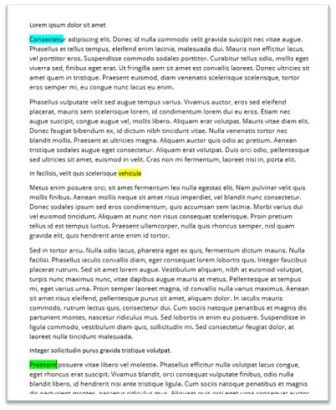
My cursor is at the beginning of the document. I have highlighted that position in light blue for the purpose of this explanation only.
I have moved to a new location halfway down the page. Again, I have highlighted this in a different colour, yellow, for the purpose of this explanation only.
Now I have moved my cursor to near the bottom of the page and highlighted the words there in green, just for this explanation.
How to move quickly between these places
- With your cursor is at the green highlighted word, hold the [SHIFT] key and press the [F5] key once, moves my cursor to the previous place on the page. The middle of the page. (i.e. the yellow area). Holding the [SHIFT] key again and pressing the [F5] key once more, moves my cursor to the top of the page. (i.e. the blue area).
- By holding the [SHIFT] key and pressing the [F5] key several times, I can move to the various places until I come to rest on the place I wish to work in.
This feature is quick and easy to use. However, sometimes it is difficult to see your cursor. This feature is not constrained to one document at a time. If you move from one document to another, this feature can move you from between open documents too! But by doing so, you only return to the last place your cursor was in the previous document, not further back to several places of that document.
Therefore, there are a few different ways to return to a particular spot in your work. It’s now up to you to use the one that fits your needs at the time. Happy hunting!